Dungeons and Dragons Player Guide
New here? Start with the beginner tab. Use the browse tab to jump by topic.
Never Played Before? Start Here
Dungeons and Dragons is collaborative storytelling. You describe what your hero tries, the Game Master narrates what happens, and dice decide uncertain moments.
Player
You control one hero. You decide their actions, personality, choices, and goals.
Game Master
The Game Master runs the world, describes scenes, and controls monsters and NPCs.
Party
You play as a team. Dungeons and Dragons is most fun when everyone supports each other's spotlight moments.
How a Turn Works (Simple Version)
- Scene: The Game Master describes where you are and what is happening.
- Intent: You say what your hero tries to do.
- Roll: If success is uncertain, you roll a d20 and add a bonus.
- Result: High rolls usually succeed, low rolls create complications.
- Story Moves: The world reacts and the scene continues.
Dice Cheat Sheet
| Die | Common Use | Example |
|---|---|---|
| d20 | Attack rolls, skill checks, saving throws | "Can I sneak past the guard?" |
| d4 / d6 / d8 / d10 / d12 | Damage and healing rolls | "My sword deals 1d8 damage." |
| d100 (percentile) | Rare special chance rolls | "What are the odds this weird event happens?" |
What to Say as a New Player
- "I want to look around the room for clues."
- "I want to persuade the guard to let us pass."
- "I attack the goblin with my sword."
- "I cast a spell to protect our party."
- "I help another player with their action."
Your First Session Checklist
Log in, pick your character, read campaign updates, then jump into the adventure.
Start Here
The Dungeons and Dragons website is your campaign hub for characters, progress, and world updates.
- Log in with your Discord account.
- View all heroes, campaign history, and map progress.
- Track your party's world exploration with fog-of-war regions.
- Use the GM page only if you are running the game.
How to Log In
- Click Login with Discord in the top-right menu.
- Approve login in Discord when asked.
- You are returned to the home page already signed in.
- Your account avatar and name appear in the top navigation.
How to Become a Game Master
- If no Game Master exists yet, the first logged-in person becomes the first Game Master automatically.
- After that, only an existing Game Master can promote another player.
- The site always keeps at least one Game Master assigned.
Game Master Only Actions
- Open the GM Panel to promote or remove Game Masters.
- Reveal new map regions as the party discovers them.
- Hide regions when needed for story control.
- Set the party's current location on the map.
- Reveal the entire map instantly if your campaign calls for it.
What Each Page Does
| Page | What You Use It For | Access |
|---|---|---|
| Home | Quick look at campaign activity, hero rankings, and realm status. | Everyone |
| Characters | Browse all active characters and filter by name, class, or race. | Everyone |
| Character Details | Open one hero sheet to see stats, gear, and profile details. | Everyone |
| Leaderboard | See which heroes are leading by level, XP, and gold. | Everyone |
| Campaign | Read the running timeline of campaign events and outcomes. | Everyone |
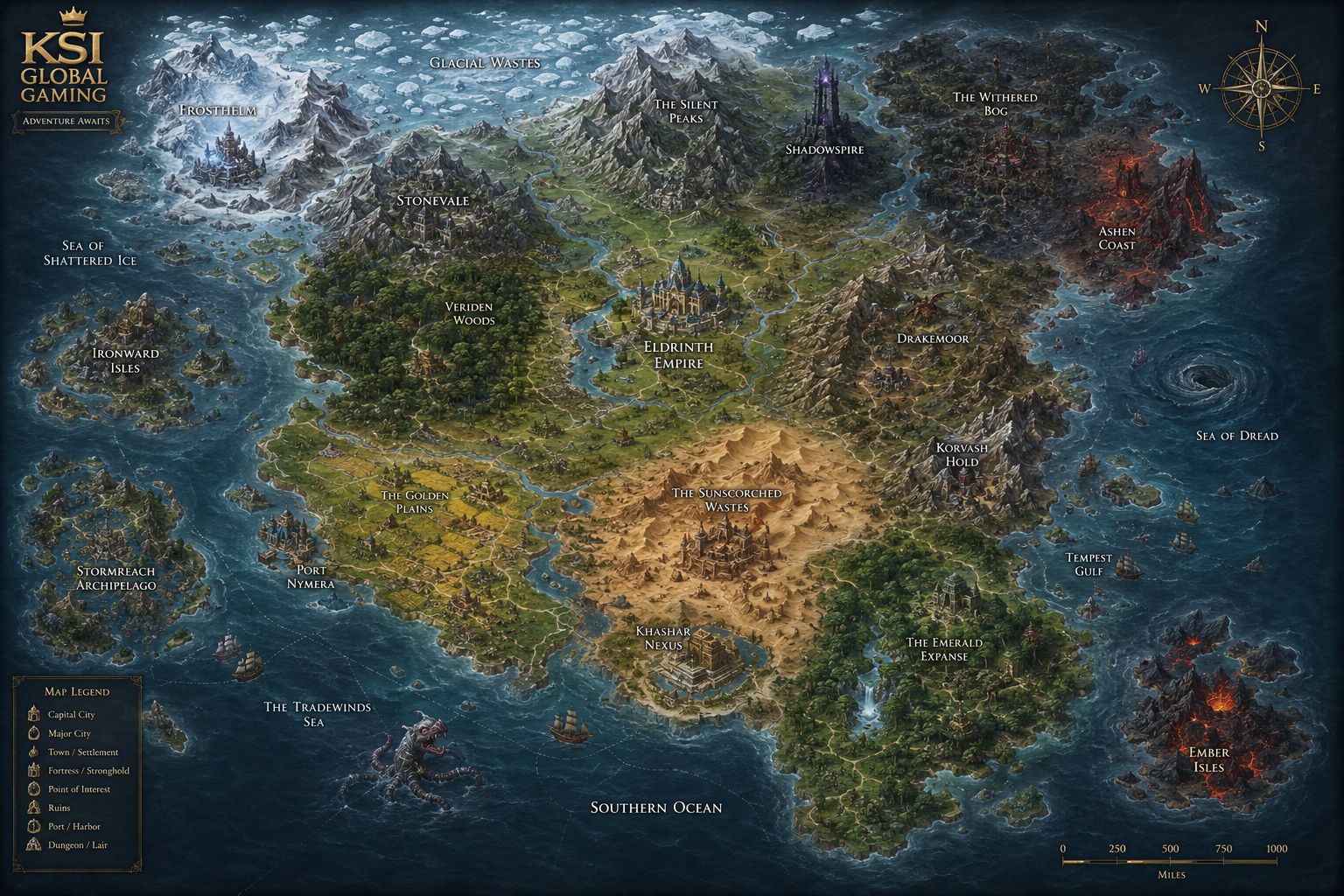
| Map | View known world regions and the party's current location. | Everyone (Game Master controls map tools) |
| GM Panel | Manage who has Game Master access. | Game Masters only |
| Guide | This player handbook page. | Everyone |
| Login / Logout | Sign in with Discord or sign out of your session. | Everyone |
Game Commands Players Will Hear
Your campaign may still use these command names in sessions or story notes. Here is what they mean in plain language.
- Character: create, view sheet, level up, or retire a character.
- Dice: roll checks, saves, and damage.
- Adventure: explore areas, browse quests, accept missions, and complete quests.
- Combat: start fights, take attacks, and end encounters.
- Magic: cast spells and track effects.
- Party: create a party, join, leave, and review members.
- Inventory: view, equip, use, and drop items.
- Shop: browse, buy, sell, and inspect item details.
- Rest: short rest and long rest recovery.
Game Master Commands At a Glance
These are the actions reserved for Game Masters:
- Combat Controls: start and end combat encounters.
- Quest Controls: create quests and mark quest completion.
- Map Controls: reveal/hide regions and update party location.
- Access Controls: promote or remove Game Masters from the GM Panel.
Quick Answers
- Who can see the site? Anyone with the link can view most pages.
- Who can manage Game Masters? Only Game Masters.
- Why is part of the map hidden? Hidden regions are unrevealed story areas.
- Where do I check my hero details? Open Characters, then click your hero name.
- Where do I follow story progress? Check the Campaign page timeline.
One-Page Player Checklist
- Log in with Discord.
- Open Characters and find your hero.
- Check Campaign for latest story updates.
- Open Map to see where the party is now.
- Use Leaderboard to compare progress with friends.
- If you are running the game, open GM Panel for GM tools.
Browse Your Way
Use these quick topic tabs when you only need one area, not the full guide.
Character Build Path
1. Concept
- Pick a fantasy vibe for your hero
- Decide what they are best at
- Set a simple goal for roleplay
2. Core Choices
- Choose class and race
- Choose background and alignment
- Pick early proficiencies
3. Combat Setup
- Check Armor Class and HP
- Know your attack bonus
- Know at least one safe action
4. Growth
- Track XP and level milestones
- Upgrade gear over time
- Refine roleplay and tactics
Playing the Game
On Your Turn
- Say your intent clearly
- Roll when asked by the Game Master
- Describe how your action looks
Core Rolls
- d20 checks for uncertain outcomes
- Saving throws for danger resistance
- Damage dice after successful hits
Common Actions
- Attack, Dash, Help, Hide, Search
- Use objects and environment creatively
- Coordinate with party members
Between Fights
- Short rest for quick recovery
- Long rest for full reset planning
- Use inventory and spells smartly
World and Creatures
Map Regions
- Stonevale
- Veriden Woods
- Eldrinth Empire
- Golden Plains
Fog-of-War
- Hidden regions are story-locked
- Game Masters reveal discoveries
- Current location tracks party progress
Creature Encounters
- Low-level foes teach basics
- Boss encounters test teamwork
- Environment can change difficulty
Quest Types
- Exploration and discovery
- Combat and survival
- Roleplay and faction choices
Resources and Quick Links
Starter Glossary
- AC, HP, Initiative
- Check, Save, Advantage
- Proficiency Bonus
- Short Rest, Long Rest
Group Setup
- Session zero expectations
- Table etiquette and pacing
- Character spotlight sharing
For New Game Masters
- Use GM Panel for role access
- Reveal map as players progress
- Keep encounters fun over perfect